

iPlayer Dynamic Background Feature Now Live: Dynamic Colors, Fluid Rhythms
iPlayer Dynamic Background Feature Now Live: Dynamic Colors, Fluid Rhythms
For local music lovers, listening is more than just an auditory experience; it's a visual immersion. We've always believed that the playback interface shouldn't just be a static image. It should breathe, move, and evolve alongside the melody.
In the latest version of iPlayer, we're proud to introduce the "Dynamic Cover Background" feature. This isn't just a background change; it's a bridge between color and emotion.
Key Features
- Smart Color Extraction: Real-time analysis of the current song's album art to extract primary and secondary color palettes.
- Dynamic Gradient Generation: Algorithmically generated smooth, fluid gradients based on the extracted colors.
- Deep Customization: Over 10+ designer-curated animation styles, supporting both Smart Follow and manual selection.
- One-Tap Toggle: Not feeling the movement? Easily enable or disable the feature in settings for complete control over your aesthetic.
1. How Does It Work?
Every album cover carries the artistic intent of the musician. iPlayer's Dynamic Background uses advanced algorithms to capture the color energy within each cover.
When you enter the player details page and enable the feature, the system automatically identifies the core color blocks. These colors then flow in the background with a "breathing" effect. Each track transition is like a watercolor wash, softly blending into the palette of the next song, keeping your listening experience fresh and vibrant.
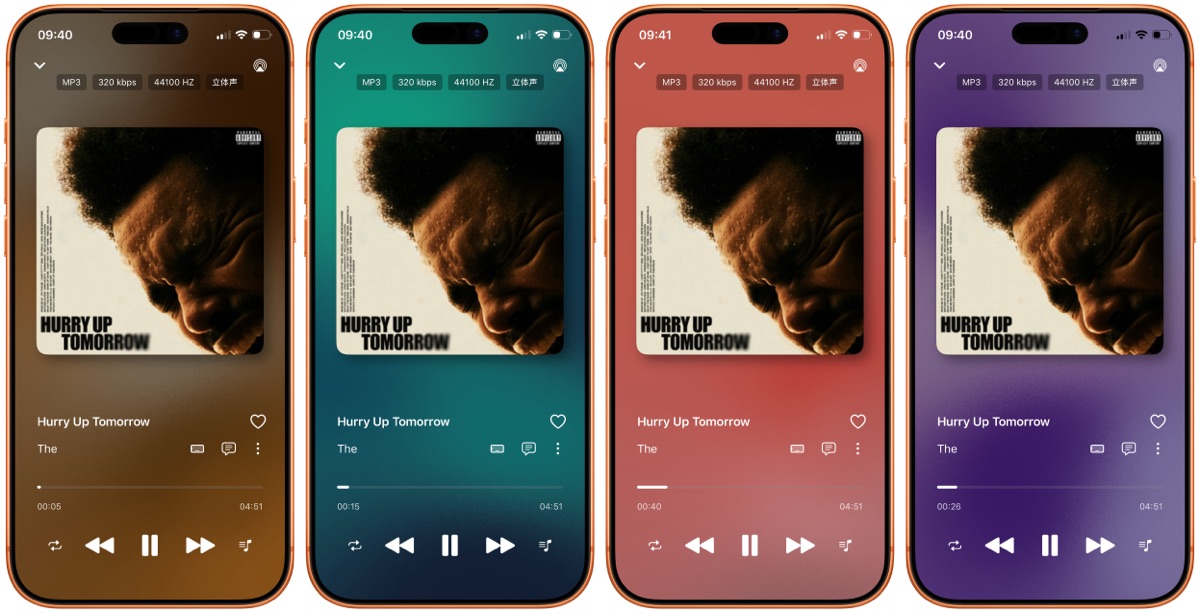
2. Match Your Mood, Define Your Style
We understand that every listener's aesthetic is unique. That's why we've provided multiple options in the settings:
- Smart Follow Mode (Recommended): The background automatically adapts to the current album art for a seamless experience.
- Manual Selection: Choose from 10+ built-in styles optimized by our designers to suit your mood.
- Custom Additions: Experiment with different color combinations to create your perfect playback atmosphere.
3. Performance and Visual Harmony
Concerned about battery life or system lag? Rest assured, our development team has deeply optimized these animations at the system level.
These gradients are rendered via the GPU, ensuring minimal power consumption. We've also carefully tuned the animation frequency to be "soft and subtle," preventing visual fatigue even during long listening sessions.
4. How to Enable?
It’s simple:
- Update to the latest version of iPlayer.
- Go to the song playback details page.
- Tap the "Background Settings" icon (or find it in global settings).
- Toggle on "Dynamic Cover Background" and start your colorful journey.
Thank you for your continued support of iPlayer. If you love this feature or have more creative ideas, feel free to leave a comment or message us!
🎧 Experience the Magic of iPlayer
Bring your album covers to life and make every song an event.
Download iPlayer on the App Store