
Should You Download Music in WAV or MP3? The Ultimate Guide for 2026
Should You Download Music in WAV or MP3? The Ultimate Guide for 2026
If you are a music lover, you have likely faced this dilemma: Should I download my favorite tracks in WAV or MP3? While both formats have their place in the digital world, the right choice depends on your hardware, your storage space, and—most importantly—your ears.
In this guide, we will break down the technical differences and help you decide which format is best for your lifestyle.
1. What is WAV? (The Lossless Standard)
WAV (Waveform Audio File Format) is the industry standard for uncompressed audio. Developed by Microsoft and IBM, it is a "lossless" format, meaning it preserves every bit of data from the original recording.
- Pros: Pristine, studio-quality sound with no data loss.
- Cons: Extremely large file sizes (approx. 10MB per minute).
- Best For: Professional music production, high-end home theater systems, and archiving music for the long term.
2. What is MP3? (The King of Convenience)
MP3 (MPEG-1 Audio Layer III) is a "lossy" compressed format. It uses "perceptual coding" to remove sounds that the human ear typically cannot hear, significantly reducing the file size.
- Pros: Small file sizes (1/10th of a WAV) and universal compatibility with every device.
- Cons: Loss of some audio nuances, especially in the high and low frequencies.
- Best For: Daily commuting, gym sessions, mobile storage, and streaming.
3. The Head-to-Head Comparison
| Feature | WAV (Lossless) | MP3 (320kbps) |
|---|---|---|
| Audio Quality | Studio Master | High Quality (Compressed) |
| File Size | Large (50-60MB per song) | Small (8-12MB per song) |
| Compatibility | High (PC/Mac/Professional Gear) | Universal (All Smartphones/Players) |
| Metadata Support | Limited | Excellent (Includes Album Art/ID3) |
4. Pro Tip: Beware of "Fake" Lossless
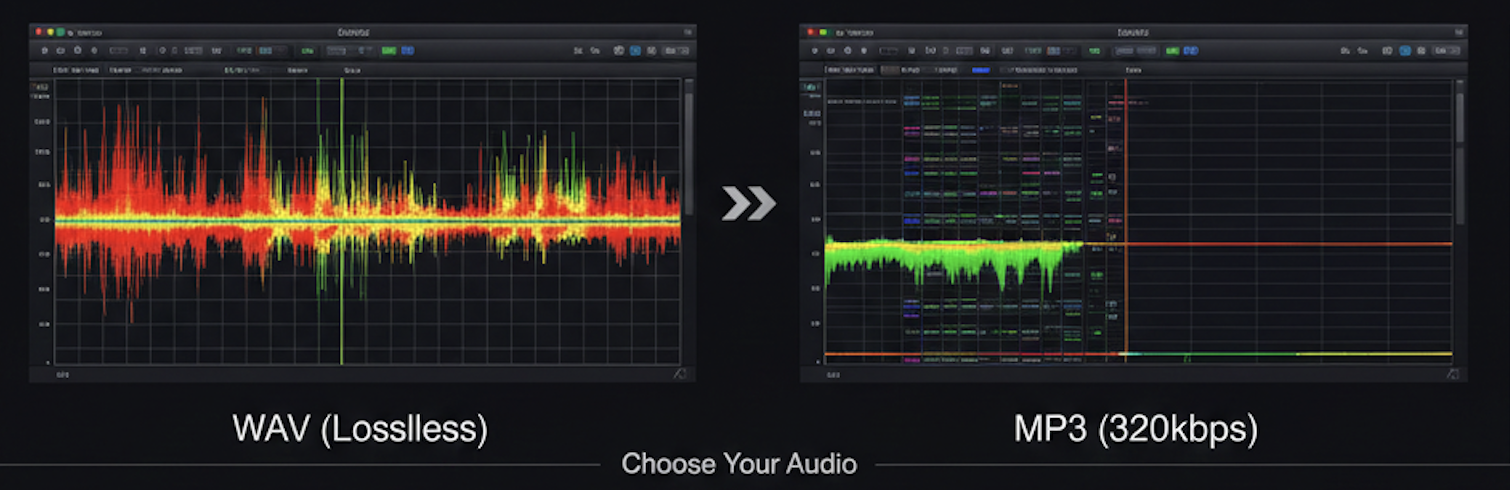
Before you download, be aware that some sites upscale low-quality MP3s into WAV format. This increases the file size without improving the sound.
Editor's Note: Always use a tool like Spek or Fakin' The Funk? to check the frequency spectrum. A real WAV should have frequencies reaching up to 22kHz, whereas an MP3-based file will usually cut off at 16kHz or 20kHz.
5. Where to Download High-Quality Music?
To ensure you are getting genuine files, always use reputable and legal platforms. Here are the best sources for both formats:
For Audiophiles (WAV / Hi-Res):
- Bandcamp: The best platform to support independent artists directly. They offer high-resolution WAV, FLAC, and AIFF downloads.
- HDtracks: A premier store for high-resolution audio files (up to 192kHz/24-bit).
- Qobuz: Offers a massive catalog of "Studio Quality" downloads for purchase.
For Everyday Listening (High-Quality MP3):
- Amazon Music: Provides high-bitrate MP3s (up to 320kbps) that sound great on most consumer devices.
- 7digital: A reliable source for purchasing individual tracks in various compressed formats globally.
- iTunes Store: Still a standard for high-quality AAC/MP3 downloads with perfect metadata integration.
Conclusion: The Verdict
The battle of WAV vs. MP3 isn't about which is "better"—it's about which is better for you.
- Choose WAV if you crave every detail of a live performance and have the storage to spare.
- Choose MP3 if you want your entire music library in your pocket and listen primarily on Bluetooth or mobile devices.

Ready to organize your music collection? Try iPlayer to manage your high-quality local library with ease.
🎧 Ready to Build Your Lossless Library?
Let iPlayer be the home for your high-quality collection. Whether WAV or MP3, experience them at their best.
- 🔊 Exclusive Mode for Studio-Quality Sound
- 📂 Powerful Folder Management for Large Libraries
- ✨ Minimalist Interface for Pure Listening