
FLAC vs WAV vs ALAC: Why FLAC is the Best Lossless Format in 2026
Why FLAC is the Most Balanced Lossless Format in 2026
Summary (TL;DR)
In the world of digital audio, WAV is too big, APE is too closed, and ALAC is too dependent on the Apple ecosystem. FLAC, an open-source format born in 2000, remains the top choice for audiophiles in 2026. Why? Because it finds a near-perfect balance in compression ratio, compatibility, sound fidelity, and metadata support.
1. Introduction: The War of Lossless Formats
In the world of digital audio, the term "lossless music format" has been discussed for over twenty years. WAV is too large, APE is too closed, ALAC is too dependent on the Apple ecosystem, DSD is too niche... But FLAC, this open-source format born in 2000, remains the first choice for most audiophiles and music lovers in 2026.
Why?
Because it has found a near-perfect balance point in four dimensions: compression ratio, compatibility, sound fidelity, and metadata support. It doesn't eat up your hard drive like WAV, nor does it make it difficult to move on Mac like APE; it guarantees "bit-perfect" sound quality restoration while providing complete tag and cover support for your music library.
In this article, we will dismantle the technical essence of FLAC and see why it stands out in the war of lossless formats and becomes the most balanced lossless audio format in 2026.
2. What is FLAC? Understanding its Mechanism with "Lossless Zip"
Full Name and Background of FLAC
FLAC stands for Free Lossless Audio Codec. Developed by Josh Coalson in 2000, it was created to solve a contradiction: How to reduce the size of audio files without losing any sound quality?
Before FLAC appeared, you had two choices: WAV (huge space occupation, a CD is about 700MB) or MP3 (lossy compression, losing high-frequency details). The appearance of FLAC allowed you to shrink files to 30-60% without sacrificing sound quality.
The "Lossless Zip" Metaphor: Compression Without Losing 1 Bit
The best metaphor to understand FLAC is to imagine it as a ZIP archive.
When you compress a document with ZIP, the compressed file size becomes smaller, but after decompression, every word and every punctuation mark is exactly the same as the original file. FLAC does the same thing for audio data: it uses algorithms to find repetitive patterns and redundant information in audio waveforms, and then stores them in a more compact way. But when you play a FLAC file, the decoder "unzips" it back to the original PCM (Pulse Code Modulation) data—every bit is exactly consistent with the original data on the CD.
This is the meaning of "lossless": no information lost, zero sacrifice in sound quality.
3. FLAC Compression Principle: Linear Predictive Coding (LPC) & Rice Coding
Technical Analysis: How LPC Predicts Audio Waveforms
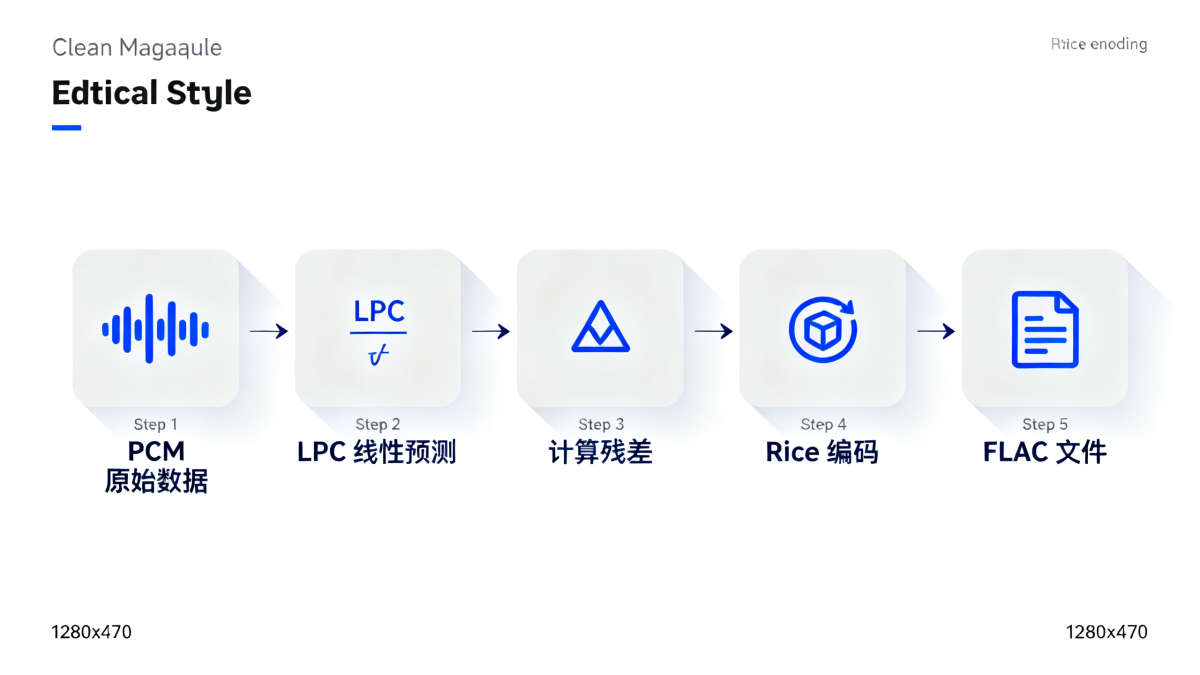
The core compression technology of FLAC is LPC (Linear Predictive Coding). Simply put, its logic is like this:
Audio waveforms are not random but follow patterns. When you see the values of the first few sample points, you can often roughly guess the value of the next sample point. LPC builds a mathematical model based on past samples to "predict" the upcoming waveform.
FLAC stores only two parts of information: the parameters of the prediction model (like a formula) and the error between the predicted value and the actual value (called "residual"). In this way, the file size is significantly reduced. When the decoder reads the FLAC file, it uses the model parameters to reconstruct the predicted waveform, adds the residual, and obtains completely accurate original data.
Rice Coding: Further Compressing Residual Data
The residual data generated by LPC can be further compressed. FLAC uses Rice Coding (an entropy coding method) to handle residuals. The logic of Rice Coding is: small numbers use short codes, and large numbers use long codes. Since most residual values are small, this coding makes the data more compact.
In the end, FLAC's compression ratio can reach 40-70% of the original WAV file. A 700MB CD usually becomes 300-400MB after being converted to FLAC—and the sound quality is exactly the same as the original CD.
4. FLAC vs WAV vs APE vs ALAC: The Ultimate Comparison
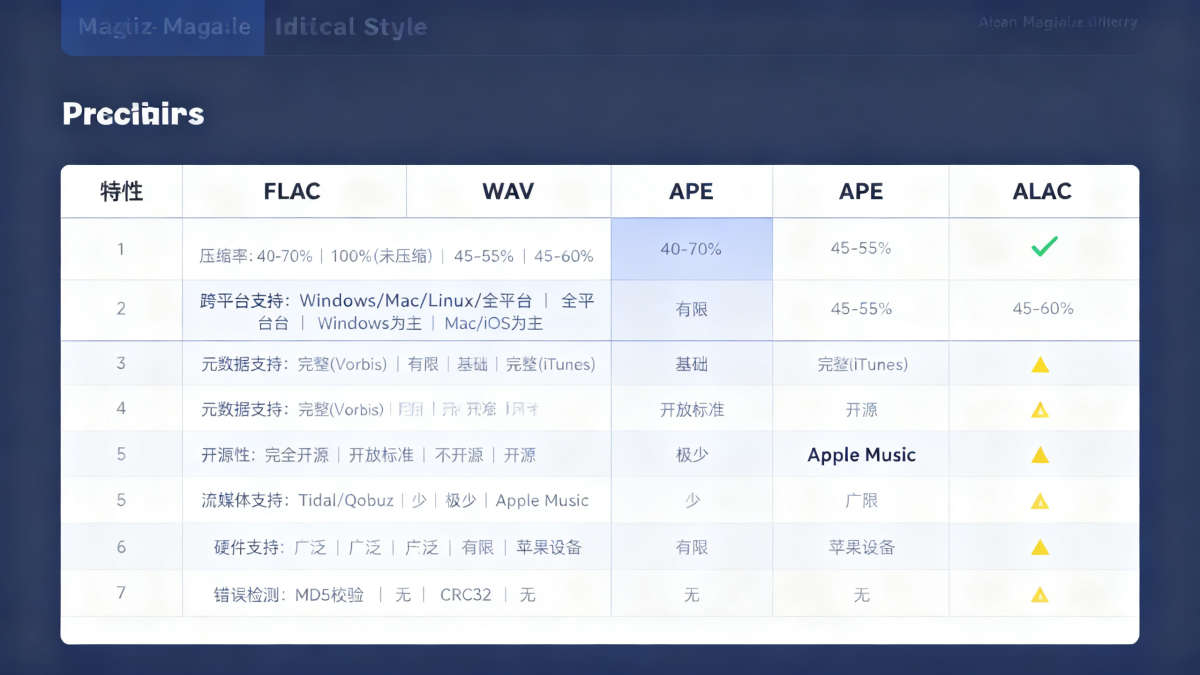
Comparison Table: Compression, Compatibility, Metadata, Openness
| Feature | FLAC | WAV | APE | ALAC |
|---|---|---|---|---|
| Compression | 40-70% | 100% (Uncompressed) | 45-55% | 45-60% |
| Cross-Platform | Win/Mac/Linux/Android/iOS | All Platforms | Mainly Windows | Mainly Mac/iOS |
| Metadata | Complete (Vorbis Comment) | Limited (ID3 not native) | Basic (APEv2) | Complete (iTunes tags) |
| Open Source | Fully Open Source | Open Standard | Closed Source | Open Source (by Apple) |
| Streaming | Tidal/Qobuz/Deezer | Few | Very Few | Apple Music |
| Hardware | Extensive (DACs/Players) | Extensive | Limited | Mainly Apple Devices |
| Error Check | MD5 Checksum | None | CRC32 | None |
Why is FLAC the "Most Balanced" Choice?
Looking at the table, you will find:
- WAV is the most universal, but the file size is too large, tag support is poor, and it is not suitable for long-term storage.
- APE has a high compression ratio, but it only works well on Windows, and support on Mac and mobile devices is poor.
- ALAC is perfect in the Apple ecosystem, but cross-platform support is not as good as FLAC.
FLAC, on the other hand, reaches an excellent level in all dimensions: compression ratio is comparable to APE/ALAC, far better than WAV; cross-platform compatibility is the strongest, supported by almost all devices and players; Vorbis Comment tag system is perfect, supporting embedded covers, lyrics, and diverse metadata; fully open source, not dependent on any commercial ecosystem, and will not be "abandoned" in the future; built-in MD5 verification ensures file integrity.
This is FLAC's "balance philosophy": not the best in a single indicator, but the best overall experience.
5. Metadata and Album Art: FLAC's Perfect Support for Library Management
What is Metadata?
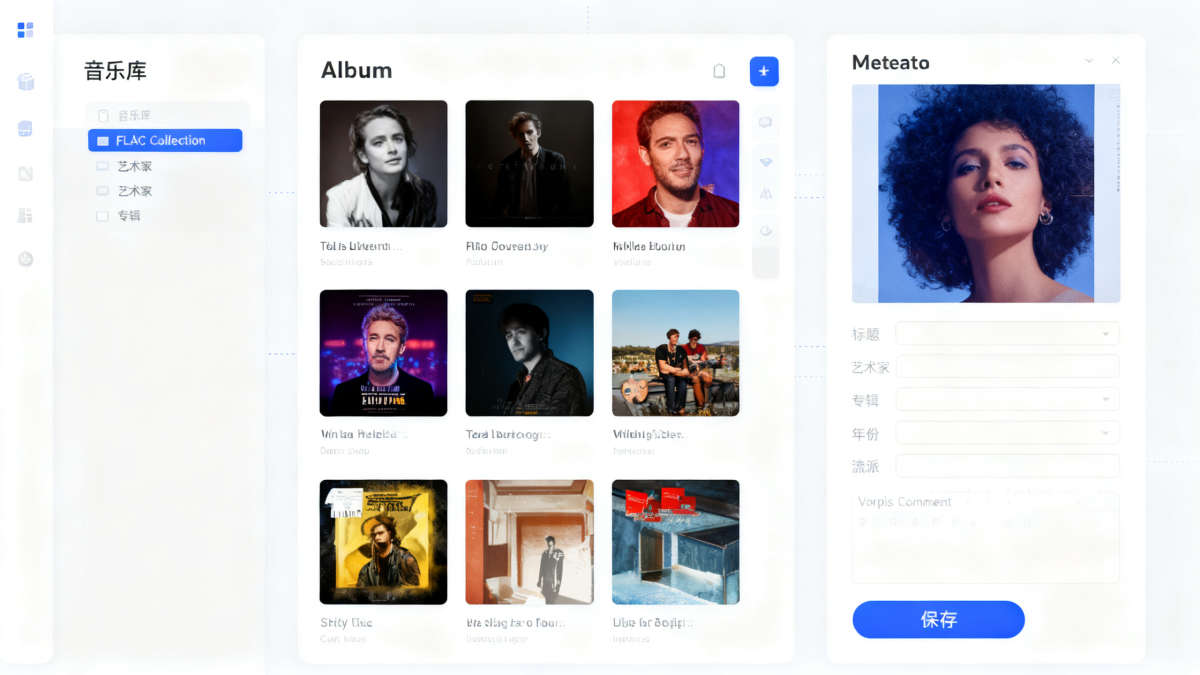
Metadata is "data about data." For music files, it includes song title, artist, album name, release year, track number, genre, BPM (beats per minute), album cover, lyrics, artist photos, etc.
This information is crucial for managing large music libraries. Without metadata, you can only see file names like "track01.flac" and cannot browse by artist or album.
FLAC's Vorbis Comment Tag System
FLAC uses the Vorbis Comment tag system. Its advantage lies in supporting UTF-8 encoding, perfectly supporting non-English characters like Chinese and Japanese; it can embed multiple high-definition images (covers, artist photos, booklets); it supports custom fields, allowing you to add any tag (such as "Mood: Chill").
In contrast, WAV's ID3 tag support is weak, and APE's APEv2 tag function is weaker. Only FLAC and ALAC achieve professional-level metadata support—and FLAC's cross-platform advantage makes it superior.
6. FAQ: Common Questions About FLAC
Q1: Does FLAC take up a lot of space?
FLAC is 30-60% smaller than WAV. A CD (700MB) converted to FLAC is usually only 300-400MB. Compared to MP3 (320kbps about 100-150MB), FLAC is indeed larger, but considering the capacity of modern hard drives reaching TB levels, this cost is completely acceptable.
Q2: Is there a difference in sound quality between FLAC and WAV?
Absolutely no difference. The decoded data of FLAC is exactly the same as WAV, every bit is identical. If you hear a difference, it may be a problem with the player or device, not the format itself.
Q3: On which platforms and devices is FLAC compatible?
FLAC supports almost all platforms: Windows/Mac/Linux/Android/iOS. In terms of streaming, Tidal, Qobuz, and Deezer all use FLAC. In terms of hardware, most DACs, players, and mobile phones support it natively.
Q4: How to get high-quality FLAC sources?
Legal channels include professional audio stores (HDtracks, Qobuz Store, 7digital), independent music platforms (Bandcamp supports FLAC download), and ripping your own CDs using EAC (Exact Audio Copy) or dBpoweramp.
Q5: Is FLAC suitable for long-term music preservation?
Very suitable. FLAC has built-in MD5 verification to verify file integrity; open-source features guarantee future compatibility; metadata support makes the music library easy to manage. Compared to the huge size of WAV and the closed nature of APE, FLAC is the best digital music archiving format.
7. Conclusion: In 2026, FLAC is Still the Wisest Choice
In the battlefield of lossless audio formats, FLAC has proven its value over more than twenty years. It is not the outlier in a certain indicator, but has found a near-perfect balance point in the four core dimensions of compression ratio, compatibility, sound fidelity, and metadata support.
For audiophiles pursuing sound quality, FLAC provides "bit-perfect" sound restoration; for users who care about storage space, its compression ratio makes hard drive utilization higher; for cross-platform users, its wide compatibility allows you to enjoy the same music experience on any device; for users managing large music libraries, its metadata support allows every song to be perfectly collected.
In 2026, dominated by streaming media, choosing FLAC is choosing a respect for music—respect for its integrity, respect for your own listening experience, and respect for that rare sense of "ownership" in the digital age.
🎧 Ready to Build Your FLAC Library?
Let iPlayer be the home for your lossless FLAC collection and start your high-fidelity auditory journey.
- 🔊 Exclusive Mode, Pursuit of Ultimate Sound Quality
- 📂 Powerful Folder & Metadata Management
- ✨ Pure Interface, Return to the Essence of Listening